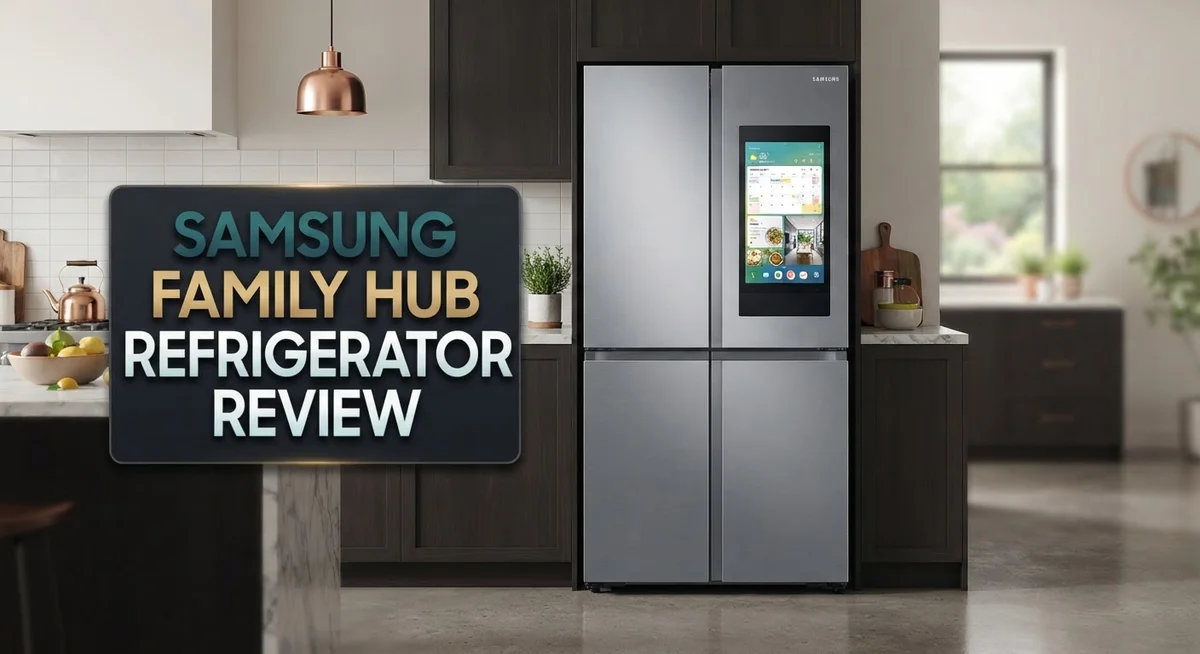
Samsung Family Hub Refrigerator Review 2026: Worth It?
Smart kitchens are here. The Samsung Family Hub Refrigerator sits right at the center of this shift. It blends everyday cooling with smart technology you can actually use.
This fridge does more than store food. It comes with a giant touchscreen display. You can plan meals, check your calendar, and even mirror your favorite shows.
Curious what is really inside your fridge? Three internal cameras let you peek inside from your phone. No more guessing if you need more milk at the store.
In a Nutshell
- Smart screen at the center. The touchscreen turns your fridge door into a control panel. You can plan meals, set reminders, and manage your grocery list right there.
- See inside without opening the door. Three cameras snap photos of your shelves. Check your phone before you shop, so you never buy duplicates again.
- Energy savings built in. SmartThings Energy tracks your usage and helps cut power bills. This model ranks #1ing in its energy efficiency category.
- Big storage for big families. Capacity ranges from 23 to 32 cubic feet. One popular model offers a 17.4 cu. ft. freezer plus fast ice production.
- Connects to your smart home. Pair it with other smart devices for a truly connected kitchen experience.
- Reliability needs attention. Some users report ice maker problems within the first few months. Repairs sometimes need multiple service visits.
Smart Display and Connected Features
The Family Hub refrigerator puts a smart display front and center on your fridge door. This 21.5″ to 32″ touchscreen acts as your kitchen command center, letting you manage grocery lists, plan meals, and access recipes without leaving the kitchen.
Connectivity is the real star here. The fridge syncs with your SmartThings app, so you can check what’s inside from anywhere. You receive notifications when doors stay open too long or when temperature shifts occur. This feature helps prevent food waste and keeps your kitchen running smoothly.
The internal camera system deserves special attention. Three cameras mounted inside give you a clear view of your shelves from your phone. No more guessing what groceries you need at the store. You can snap photos of your fridge contents and review them while shopping. This simple feature saves time and reduces impulse purchases.
Smart home integration makes this fridge part of your bigger picture. You can connect it with other Samsung devices like smart speakers and lighting systems. Voice commands work too, so you can ask your fridge to show recipes or add items to your shopping list. The refrigerator becomes a hub that talks to your entire home.
Energy monitoring through SmartThings Energy tracks your power consumption in real time. The system identifies which appliances use the most electricity and suggests ways to cut your usage. Users report up to 10% energy savings with these insights. This fridge ranks number one in energy efficiency among smart refrigerators, making it a solid choice for eco-conscious families.
The touchscreen display feels responsive and intuitive. Navigation is straightforward, and the interface updates regularly with new features. You can customize the home screen to show family calendars, weather, or news. The display also functions as a digital bulletin board for family messages and schedules.
One thing to keep in mind: early models experienced some reliability issues with ice makers. Some users reported problems within the first three months of ownership. This highlights the importance of choosing a reliable service plan and staying informed about potential issues before purchase.

Last update on 2026-10-19 / Affiliate links / Images from Amazon Product Advertising API
Capacity, Dimensions, and Storage Design
The Samsung Family Hub comes in multiple sizes to fit different household needs. You can choose from 23 to 32 cubic feet of total storage space. Most models measure around 35.9 inches wide and 73 inches tall, so measure your kitchen space before ordering.
Inside, the layout works hard for you. The freezer holds about 17.4 cubic feet in typical models, leaving plenty of room for fresh food on the refrigerator side. The shelving is flexible, so you can adjust compartments based on what you’re storing this week.
The touchscreen sits right on the door and comes in sizes from 21.5 inches up to 32 inches on larger models. This display takes up valuable door real estate, but it serves a purpose beyond looks. You can see your grocery list, check recipes, or control other smart home devices without leaving the kitchen.
Storage design focuses on access and visibility. The three internal cameras position themselves to capture clear images of all your shelves. You’ll see produce drawers, beverage sections, and freezer compartments from your phone. This means fewer guesses about what you actually have when shopping.
The ice maker produces up to 5.1 pounds of ice daily on standard models. This keeps pace with active families who need cold drinks throughout the day. The water and ice dispensers sit conveniently on the front, so guests can help themselves.
One practical note: the touchscreen and camera system require regular cleaning. Fingerprints show easily on the display, and camera lenses need occasional wiping for clear photos. This adds a small maintenance task to your routine.
The overall design balances modern tech with practical storage. Shelves hold standard grocery items without trouble. The door compartments fit milk jugs, condiments, and bottles neatly. Everything feels spacious without being wasteful. Whether you have a small family or cook for crowds, a model in this range probably fits your lifestyle.
Energy Efficiency and Performance
The Samsung Family Hub refrigerator stands out in the energy efficiency category with its SmartThings Energy monitoring system. This feature tracks your power consumption in real time and helps you cut electricity usage by up to 10 percent.
The fridge earned a #1 ranking for energy efficiency among smart refrigerators. This means it uses less power than comparable models while delivering the same cooling performance. The system works by analyzing your usage patterns and suggesting ways to optimize settings.
The touchscreen display and internal camera system do consume some power, but Samsung engineered them to minimize energy drain. The cameras only activate when you request a view through your phone app. This approach keeps electricity usage low compared to older refrigerators that run continuously without smart controls.
Real time monitoring matters more than you might think. When you can see exactly how much energy your fridge uses each day, you make smarter decisions. The SmartThings app shows your consumption data in an easy to read format. You spot patterns and adjust accordingly.
The 115V/60Hz power requirement is standard for household refrigerators, so installation fits any normal kitchen outlet. The fridge works efficiently across different room temperatures and usage levels. Whether you open the door frequently or rarely, the system adapts to your habits.
One practical benefit: the ice maker’s 5.1 pound daily capacity runs on an efficient cycle. It doesn’t waste energy by running constantly. Instead, it produces ice on demand and maintains it in the freezer section.
The larger models (up to 32 cubic feet) use more power than smaller ones, which is expected. However, the energy savings technology helps offset the increased capacity. Families get more storage without proportionally higher electricity bills.
The bottom line: If energy efficiency matters to you, this refrigerator delivers measurable results. The combination of smart monitoring, efficient components, and adaptive technology keeps your power consumption reasonable. You get modern features without sacrificing environmental responsibility.
Top 3 Alternatives
LG InstaView Refrigerator


Last update on 2026-10-19 / Affiliate links / Images from Amazon Product Advertising API
The LG InstaView lets you peek inside without opening the door. You tap the glass panel twice, and it becomes transparent. This feature saves energy since cold air stays inside longer.
The fridge includes a smart display on the door. You can check recipes, watch videos, and control your smart home devices from the kitchen. The ice maker produces both cubed and crushed ice. Temperature zones keep different foods fresh at their ideal settings. The InstaView works with voice assistants for hands-free control.
Whirlpool Smart Refrigerator

Last update on 2026-10-19 / Affiliate links / Images from Amazon Product Advertising API
Whirlpool’s smart fridge connects to your phone through an app. You get alerts when the door stays open too long. The app tells you what’s inside, so you won’t buy duplicate items at the store.
The fridge includes adaptive defrost technology. This system learns your usage patterns and defrosts only when needed. You save energy without sacrificing food quality. The shelves adjust easily to fit tall items. The water and ice dispensers work reliably. Remote temperature control lets you adjust settings from anywhere.
GE Profile Refrigerator

Last update on 2026-10-19 / Affiliate links / Images from Amazon Product Advertising API
GE Profile models feature a convertible drawer that switches between freezer and fridge modes. This flexibility helps when you need extra space for fresh groceries or frozen items.
The smart features include a built-in camera. You can view your fridge contents from your phone. The stainless steel finish resists fingerprints. Dual ice makers produce plenty of ice for busy families. The fridge learns your habits and suggests energy-saving adjustments. WiFi connectivity keeps everything connected to your smart home system.
Internal Camera System and Remote Access
The internal camera system gives you real visibility into your fridge from anywhere. Samsung built three cameras into the Family Hub refrigerator. These cameras sit at different angles inside the fridge compartment. You see exactly what groceries you have without opening the door.
The SmartThings app connects your phone to these cameras instantly. You can check your fridge contents while shopping at the grocery store. This feature helps you avoid buying duplicate items. It also prevents food waste when you forget what you already have at home.
The camera feed updates in real time on your phone. You get a clear view of shelves, drawers, and storage areas. The image quality is sharp enough to read labels on containers. This means you can check expiration dates from your phone too.
Remote access works seamlessly across your household. Family members can all view the same camera feed through their own phones. Kids can ask parents what snacks are available. Parents can check if someone forgot to buy milk before heading home.
The cameras require a stable WiFi connection to function properly. Your home network needs to reach the fridge location for best performance. Samsung’s app handles the connection automatically once you set it up initially.
One practical consideration: the camera lenses need occasional cleaning. Condensation or dust can build up on the internal camera windows over time. A quick wipe with a soft cloth keeps the image quality clear. This simple maintenance takes just seconds.
The camera system integrates with your SmartThings account. Your login credentials secure all footage and data. Samsung does not store camera images on their servers by default. Your viewing happens directly between your phone and your fridge.
This remote access feature works even when you travel away from home. You can check your fridge from another city or country. The app works on both iOS and Android devices. This flexibility makes meal planning easier no matter where you are.
Reliability and Maintenance Concerns
The Samsung Family Hub refrigerator has shown some early reliability challenges that deserve your attention. Several owners reported ice maker failures within the first three months of ownership. This is a significant concern because the ice maker is a core feature many people rely on daily.
Service visits become necessary when these issues emerge. Multiple repair appointments have been documented in user reports. The repair process can take time, and scheduling appointments with Samsung service technicians requires patience.
The touchscreen display itself has proven fairly durable in most cases. However, the integration between the display and the refrigeration system occasionally causes software glitches. These glitches typically resolve with a power cycle or software update, but they can be frustrating when they occur.
The internal camera system shows good long term stability. Most users report consistent performance after the first year of use. The cameras continue to function reliably when kept clean and when WiFi remains stable in your home.
Preventive maintenance helps avoid major problems. Regular cleaning of camera lenses keeps the system working smoothly. Wiping down the touchscreen prevents dust buildup that can interfere with responsiveness. These simple steps extend the lifespan of both features.
The compressor and cooling system have not shown widespread failure patterns. This suggests Samsung’s core refrigeration technology remains solid. The problems tend to concentrate in the smart features rather than basic cooling performance.
Warranty coverage matters here. Samsung typically includes a standard warranty on parts and labor. Check your specific model’s warranty terms before purchase, as coverage varies. Extended warranty options may be worth considering given the early ice maker failures some owners experienced.
Parts availability for repairs has generally been adequate. Samsung maintains a network of authorized service centers in most regions. Replacement components arrive relatively quickly when needed, though wait times vary by location.
The reliability picture improves significantly after the first year. Owners who pass that initial period typically report stable, trouble free operation. This suggests early manufacturing batches may have had issues that were corrected in later production runs.
Pros and Cons
Pros
- Built in touchscreen lets you organize groceries and plan meals right from your kitchen
- Three internal cameras show you what’s inside your fridge from your phone, anywhere you go
- SmartThings Energy monitoring helps you save up to 10% on power usage each month
- Earned #1 ranking for energy efficiency among smart refrigerators in its category
- Connects to your smart home devices for seamless kitchen automation
Cons
- Early reliability issues reported, including ice maker failures within the first 3 months of use
- Some owners needed multiple service visits to fix problems with their units
- Camera lenses require occasional cleaning to maintain clear visibility and proper function
- Touchscreen and camera systems need a stable WiFi connection to work as intended
Who Should Buy It
The Samsung Family Hub refrigerator works best for specific types of households. If you love smart home technology, this fridge fits perfectly into your kitchen ecosystem.
Busy families benefit most from this model. The three internal cameras let you check what’s inside without opening the door. You save time during grocery shopping. You avoid buying duplicate items. Parents can monitor food supplies while at work or running errands.
Home cooks and meal planners appreciate the touchscreen display. You can organize recipes right on the fridge. The touchscreen helps you plan weekly menus. You can make shopping lists directly from the kitchen. This feature works great if you enjoy cooking and want everything in one place.
Tech enthusiasts should consider this refrigerator. The SmartThings integration appeals to people building connected homes. The energy monitoring dashboard shows real time power usage. You can track consumption patterns and adjust habits accordingly. The WiFi connectivity means you control settings from your phone.
People who value energy efficiency find this model attractive. The fridge earned top ranking for power consumption in its category. You get up to 10% energy savings monthly. This appeals to environmentally conscious households and those watching utility bills.
However, this fridge isn’t ideal for everyone. If you prefer simple, traditional appliances without technology, skip this model. The touchscreen and cameras add complexity you may not want. If you rarely cook or have minimal smart home devices, the advanced features won’t serve you well.
Consider your reliability expectations too. Early reports mention ice maker failures within three months on some units. If you need absolute dependability without service calls, research warranty options carefully. Multiple service visits have been necessary for certain owners.
Apartment dwellers and renters should think twice. The large dimensions require dedicated space. Installation involves WiFi setup and SmartThings account creation. Moving the unit becomes challenging due to its size and weight.
The Samsung Family Hub works best for tech savvy families who cook regularly, value smart home integration, and want remote food monitoring capabilities.
Final Verdict
The Samsung Family Hub refrigerator brings smart technology into everyday kitchen life. It blends useful features with a few bumps along the way. Your final decision depends on what you value most in a fridge.
This appliance shines for people who love connected living. The screen, cameras, and app features work together smoothly. They turn a basic task like grocery shopping into something simple and fun.
At the same time, this fridge asks you to trust new technology in your kitchen. Some early units showed hiccups that traditional fridges rarely have. That tradeoff matters when you choose a major appliance for your home.
Think about how you use your kitchen each day. If you already rely on apps and smart devices, this fridge fits your routine well. It adds one more helpful piece to your connected home setup.
If you want a fridge that simply keeps food cold, this model may feel like more than you need. Extra features mean extra parts that could need attention over time. Simplicity has its own value.
Overall, the Samsung Family Hub delivers strong performance for tech forward households. The energy savings alone make it worth a look for eco conscious buyers. Its smart features offer real convenience once you learn how to use them.
Weigh the touchscreen benefits against the chance of early repairs. Many owners find the daily convenience outweighs occasional service calls. Others prefer to wait for the technology to mature further.
This fridge works best as a long term investment in smart kitchen living. You get more than cold storage; you get a connected hub for your whole family. That hub can simplify meal planning, grocery lists, and home automation.
In the end, choose based on your comfort with new technology. If smart features excite you, this fridge delivers real value. If you prefer proven simplicity, a standard model might suit you better.
Frequently Asked Questions
How do the internal cameras work on the Samsung Family Hub?
The fridge includes three built-in cameras positioned inside to show you what’s stored on each shelf. You view the camera feed through the SmartThings app on your phone or tablet from anywhere. This means you can check if you have milk before you leave work or confirm what groceries you need while shopping.
The cameras work best when you keep the lenses clean. Dust and condensation can blur the image over time. A quick wipe with a soft cloth keeps visibility sharp and helps the system function properly.
Can the touchscreen display control other smart home devices?
Yes. The Family Hub screen connects to your SmartThings ecosystem. You can control compatible lights, thermostats, door locks, and other smart devices directly from the refrigerator’s display. This creates a central hub for your connected kitchen and home.
The integration makes daily tasks simpler. Start your coffee maker, adjust your thermostat, or check your front door camera without leaving the kitchen.
What happens if the ice maker stops working?
Early reports show some units experienced ice maker failures within the first three months of ownership. If your ice maker malfunctions, contact Samsung support to arrange a service visit. Some owners needed multiple repairs to resolve the issue completely.
This reliability concern matters when making your decision. Consider whether you can handle potential repair visits during the first year of ownership.
Does the Family Hub really save energy?
The SmartThings Energy monitoring tracks your fridge’s power usage in real time. Owners report up to 10% monthly energy savings when using these insights to adjust settings. The model earned the number one ranking for energy efficiency among smart refrigerators in its category.
Lower energy consumption means reduced utility bills over time. This feature appeals to households focused on sustainable living.

Hi, I’m Rose Callahan, the creator of SpaceSmart.blog.
I review home essentials, gadgets, security tools, kitchen gear, furniture, and cleaning products from Amazon.
My goal is to help you create a smarter, more organized, and comfortable living space.
I test and share practical products that make everyday home life easier and more efficient.
Join me as I explore clever ways to upgrade your home—one smart find at a time.